
Reference Architectures
📝 Context
You need to provide a customer with a starting-point architecture for their use case. Reference architectures are not prescriptions — they're opinionated starting points that accelerate design conversations by giving everyone something concrete to react to.
📋 When to Use Reference Architectures
- [ ] Customer is starting a new project and needs architectural direction
- [ ] Customer's existing architecture has fundamental issues and needs rethinking
- [ ] You need to illustrate how components fit together during a design review
- [ ] Customer asks "how would you architect this?" and needs more than a whiteboard sketch
- [ ] You're comparing approaches and need a baseline for each option
🎯 Building a Reference Architecture
What Makes a Good Reference Architecture
A reference architecture should be:
- Opinionated but adaptable — take clear positions on technology choices, but explain which constraints would change the recommendation
- Layered — show the architecture at multiple levels of abstraction (business flow, logical components, physical deployment)
- Honest about tradeoffs — every architecture choice has a cost. Name it.
- Scoped — cover one use case well rather than trying to be universal
Structure
%%{init: {'theme': 'neutral', 'themeVariables': {'fontSize': '14px'}}}%%
flowchart TD
    A[Context and constraints] --> B[Logical architecture]
    B --> C[Physical architecture]
    C --> D[Key decisions]
    D --> E[Operational model]

    B -. explains .-> Flow[Data flow and trust boundaries]
    C -. maps to .-> Infra[Regions, networks, clusters, stores]
    D -. records .-> ADR[Architecture decision records]
1. Context & Constraints
Start with what shaped the architecture:
- Business requirements (latency, throughput, availability targets)
- Team constraints (size, skill set, on-call capacity)
- Compliance requirements (data residency, encryption, audit logging)
- Budget constraints (monthly run-rate ceiling)
- Existing systems that must be integrated with
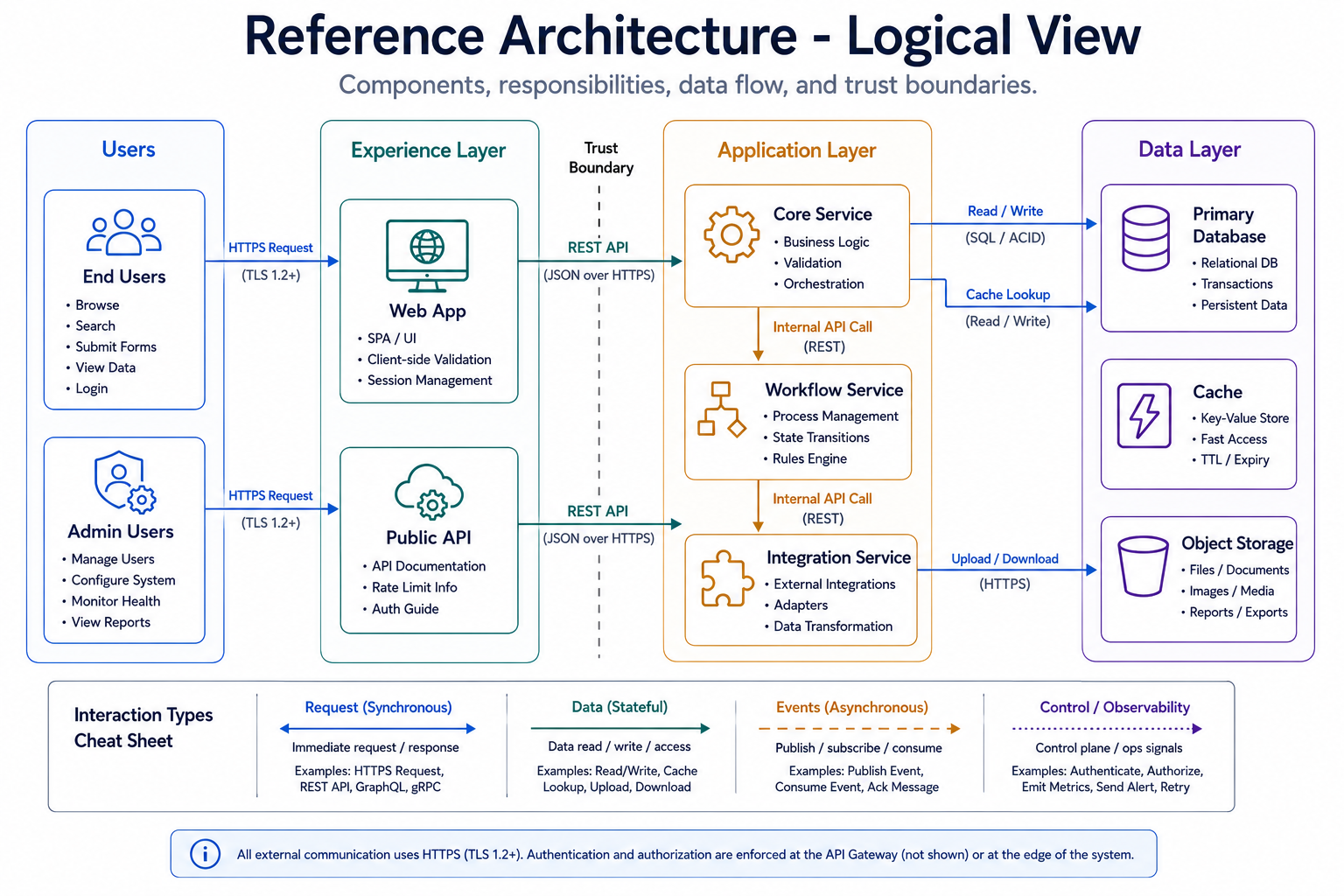
2. Logical Architecture
Component-level view showing:
- Service boundaries and responsibilities
- Data flow between components
- Integration points with external systems
- Trust boundaries and security zones
- Async vs. sync communication patterns
3. Physical Architecture
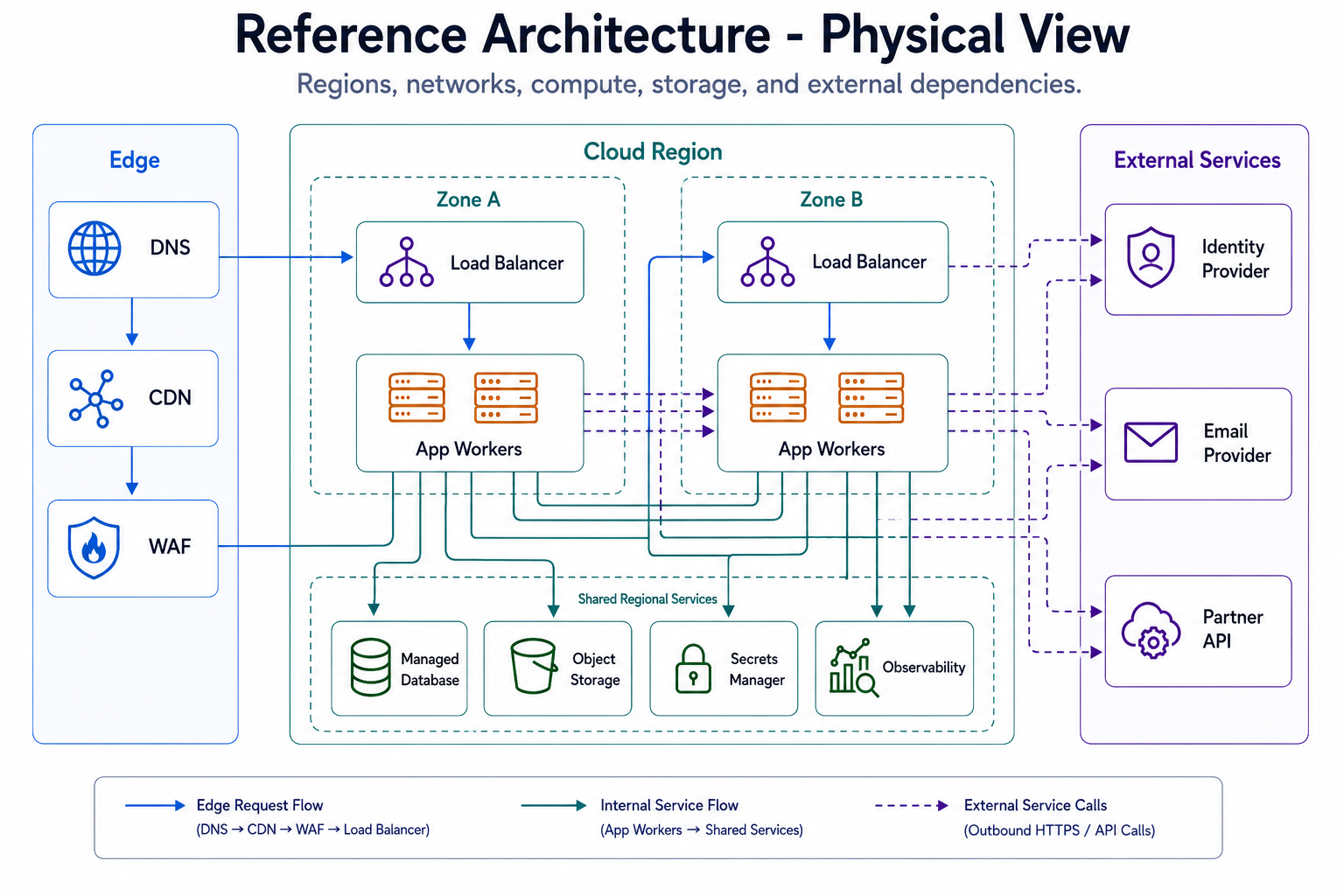
Deployment-level view showing:
- Infrastructure layout (regions, availability zones, clusters)
- Network topology (VPCs, subnets, load balancers)
- Data stores and their replication topology
- Compute placement (containers, serverless, VMs)
- CDN and edge placement if applicable
4. Key Decisions
For each major architectural choice, document:
- What was decided
- What alternatives were considered
- Why this option was chosen given the constraints
- When you'd revisit this decision (see ADR Template)
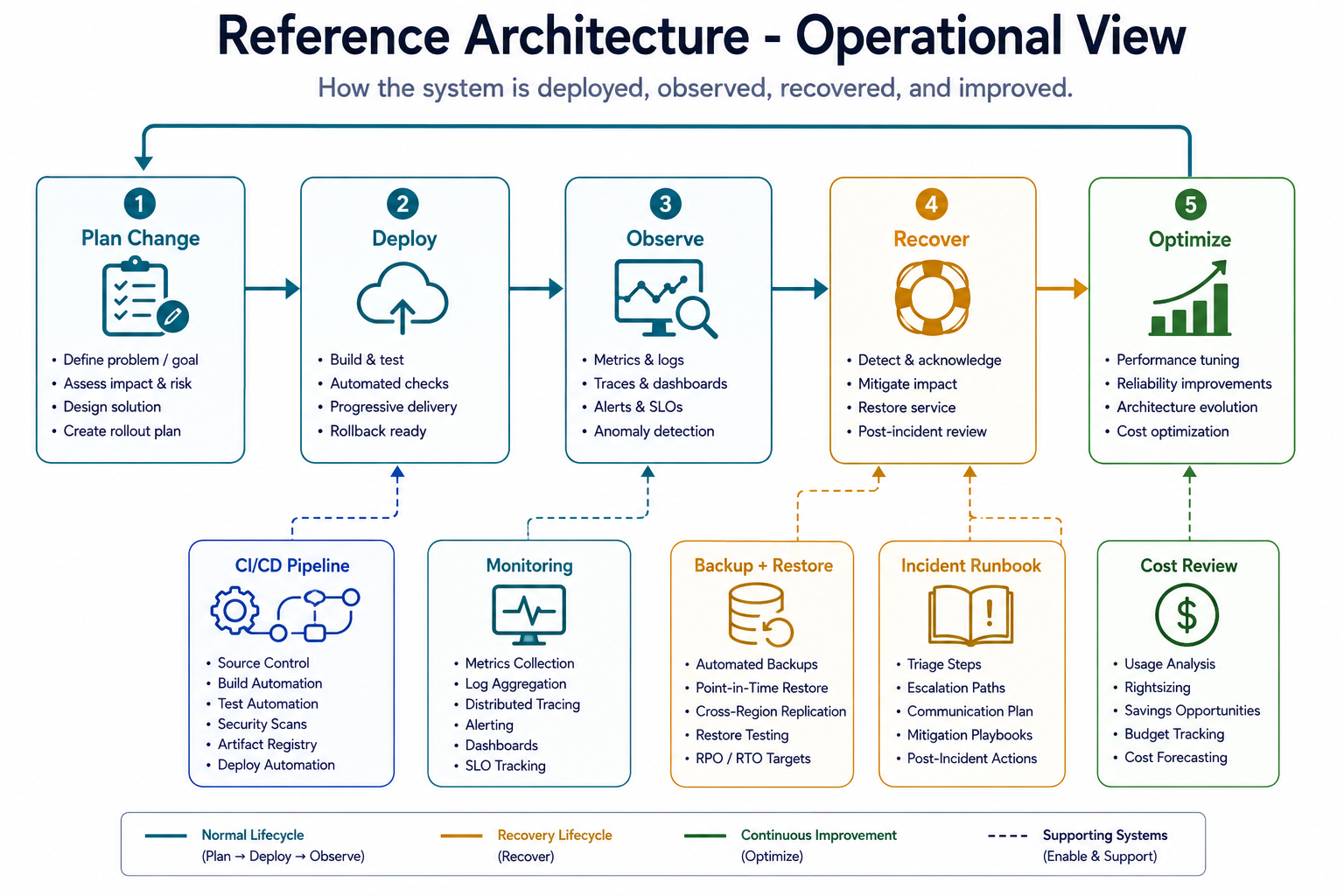
5. Operational Model
How this architecture is run day-to-day:
- Deployment strategy (blue-green, canary, rolling)
- Monitoring and alerting approach
- Backup and disaster recovery
- Scaling triggers and mechanisms
- On-call and incident response expectations
Common Reference Architecture Patterns
Web Application (Three-Tier)
- When: Standard request-response workloads, CRUD-heavy applications
- Components: CDN → Load Balancer → Application Tier → Database
- Key decisions: Managed database vs. self-hosted, session management, caching layer
- Watch out for: Stateful application servers blocking horizontal scaling
Event-Driven Processing
- When: Async workloads, decoupled producers/consumers, variable throughput
- Components: Event source → Message broker → Processors → Data stores
- Key decisions: Message ordering guarantees, exactly-once vs. at-least-once, dead letter queues
- Watch out for: Debugging distributed async flows, poison messages, consumer lag
- See also: Event-Driven Patterns
Microservices
- When: Multiple teams, independent deployment cycles, domain-driven boundaries
- Components: API Gateway → Service mesh → Individual services → Shared data infrastructure
- Key decisions: Service boundaries, inter-service communication, data ownership
- Watch out for: Distributed monolith, chatty services, operational complexity outpacing team capacity
- See also: Microservices Patterns
Data Pipeline
- When: ETL/ELT workloads, analytics, ML feature engineering
- Components: Ingestion → Processing → Storage → Serving
- Key decisions: Batch vs. stream, schema-on-read vs. schema-on-write, data partitioning
- Watch out for: Late-arriving data, schema evolution, pipeline debugging
- See also: Data Mesh Patterns
Hybrid Cloud
- When: Regulatory constraints, migration in progress, burst capacity needs
- Components: On-prem core → Connectivity layer → Cloud extension
- Key decisions: What stays on-prem vs. what moves, connectivity model, identity federation
- Watch out for: Latency between environments, split-brain scenarios, inconsistent tooling
- See also: Hybrid Environment Guide
🎯 Presenting Reference Architectures
Do:
- Present as a starting point, not a finished design — "Here's how we'd typically approach this"
- Walk through the decisions, not just the boxes and arrows
- Highlight where their constraints would change the design
- Leave room for their input — the best architecture incorporates their domain knowledge
Don't:
- Present it as the only option — always have an alternative
- Skip the "why" — boxes on a diagram without rationale are meaningless
- Ignore their existing investments — a reference architecture that requires ripping out everything they have is a non-starter
- Over-engineer — match complexity to their team's capacity to operate it
⚠️ Gotchas
- Reference architectures that assume unlimited budget — always include a "lighter" variant
- Diagrams without decision rationale — why this component? why not the alternative?
- Ignoring the team that has to operate it — a two-person team can't run a 30-service mesh
- Not updating reference architectures as services evolve — stale references erode trust
- Presenting cloud-specific architectures to multi-cloud customers without adaptation
- Treating reference architectures as immutable — they should be versioned and evolved
🔗 Links
- Design Review
- Well-Architected Review
- ADR Template
- Microservices Patterns
- Event-Driven Patterns
- CI/CD Pipeline Design — the delivery pipeline behind the operational view
- Environment Guides
📚 Further reading
Vendor and community reference-architecture libraries to draw from:
- AWS Architecture Center — vetted reference architectures and diagrams
- Azure Architecture Center — reference architectures, patterns, and the icon set
- Google Cloud Architecture Center — reference designs and best practices
- CNCF Cloud Native Landscape — the map of cloud-native building blocks
- Azure Architecture Icons — official icons for the diagrams you'll draw