Lab 07 · Serverless Operations
DevOps Studio › Labs › Lab 07 · ⏱ 1–2 hours · Intermediate
Build event-driven apps with no servers to manage. By the end you'll have a REST API, an event processor, and a Step Functions workflow running on Lambda, API Gateway, DynamoDB, and EventBridge.
On this page: Architecture · Prerequisites · Quick Start · Detailed Setup · Project Structure · Core Components · Troubleshooting · Cleanup
What you build
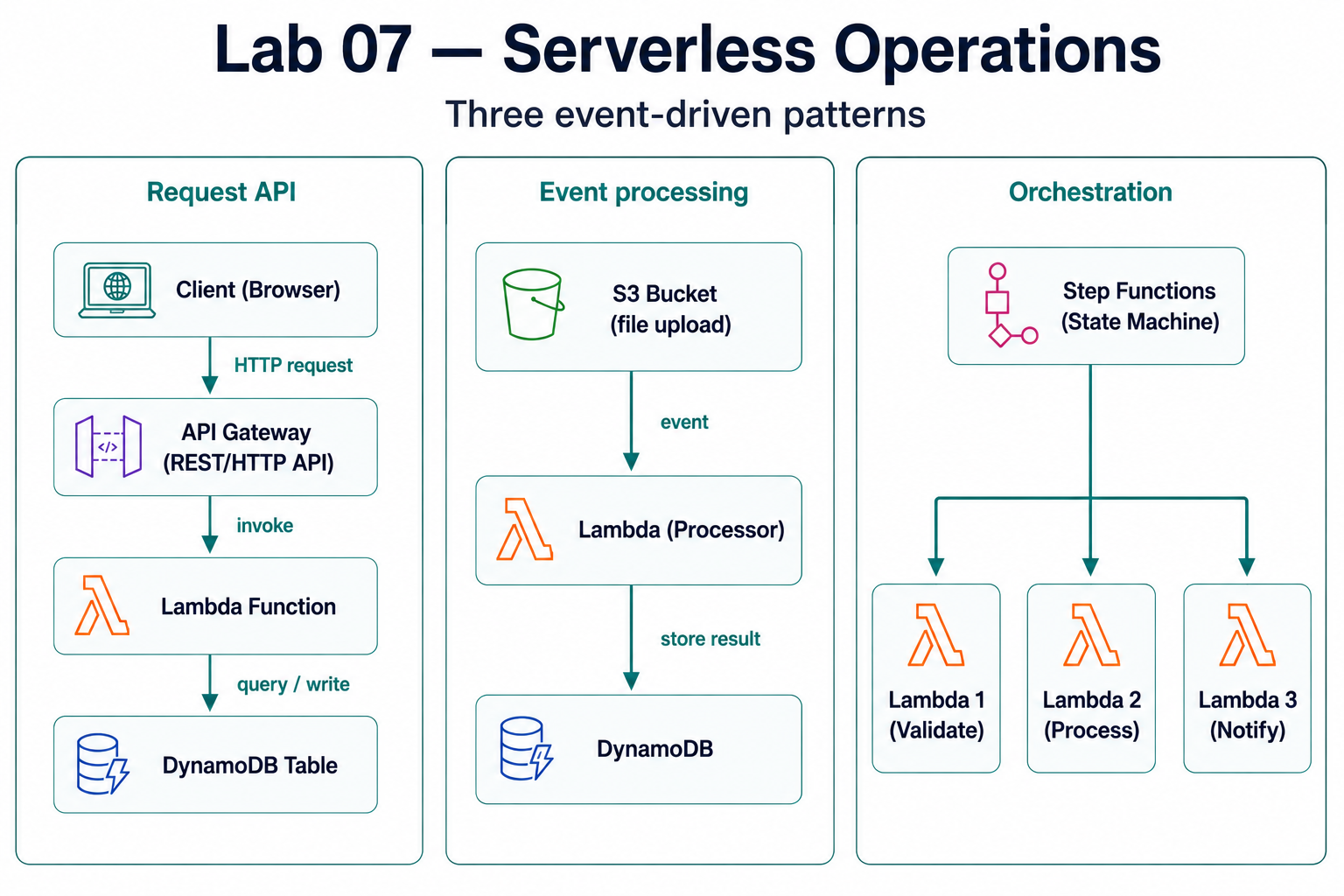
- A REST API — API Gateway → Lambda → DynamoDB
- Event processing — S3 / EventBridge → Lambda
- A Step Functions workflow orchestrating several Lambdas
- Monitoring for serverless functions
Skills you'll practice: Lambda functions · API Gateway · DynamoDB · EventBridge · Step Functions · event-driven design · the serverless cost model.
Architecture
Prerequisites
Required Tools
| Tool | Version | Purpose |
|---|---|---|
| AWS CLI | 2.0+ | AWS service management |
| Python | 3.9+ | Lambda runtime |
| Node.js | 18+ | Lambda runtime |
| Terraform | 1.9+ | Infrastructure as Code |
| Docker | 20.10+ | Local testing (optional) |
AWS Requirements
- AWS Account with appropriate permissions
- IAM User/Role with Lambda, API Gateway, DynamoDB permissions
- AWS CLI configured with credentials
Knowledge Prerequisites
- Basic programming (Python or Node.js)
- Understanding of REST APIs
- Basic AWS knowledge
- Understanding of Lab 01 (Terraform Foundations)
Lab Dependencies
Recommended: Complete Lab 01 for Terraform basics.
Quick Start
For experienced users who want to deploy immediately:
# 1. Navigate to lab directory
cd labs/07-serverless-operations

# 2. Configure AWS credentials
aws configure

# 3. Initialize Terraform
make init

# 4. Deploy infrastructure
make deploy

# 5. Test the API
make test-api
Setup time: ~30-45 minutes
Estimated cost: $1-3 to complete (vs $25-45/month if kept running)
Detailed Setup
Step 1: Configure AWS Credentials
# Configure AWS CLI
aws configure

# Enter:
# - AWS Access Key ID
# - AWS Secret Access Key
# - Default region (e.g., us-west-2)
# - Default output format (json)

# Verify configuration
aws sts get-caller-identity
Step 2: Set Up Environment Variables
# Create terraform.tfvars
cp terraform.tfvars.example terraform.tfvars

# Edit terraform.tfvars with your values
# - project_name
# - aws_region
# - environment
Step 3: Initialize Terraform
# Initialize Terraform
terraform init

# Or use Makefile
make init
Step 4: Review and Deploy
# Review what will be created
terraform plan

# Deploy infrastructure
terraform apply

# Or use Makefile
make deploy
Project Structure
labs/07-serverless-operations/
├── README.md                    # This file
├── Makefile                     # Automation commands
├── main.tf                      # Main Terraform configuration
├── variables.tf                 # Variable definitions
├── outputs.tf                  # Output values
├── terraform.tfvars.example    # Example variables
├── lambda/                      # Lambda functions
│   ├── hello-world/            # Simple Lambda example
│   │   ├── lambda_function.py
│   │   ├── requirements.txt
│   │   └── README.md
│   ├── api-handler/             # API Gateway handler
│   │   ├── lambda_function.py
│   │   └── README.md
│   └── event-processor/        # Event-driven Lambda
│       ├── lambda_function.py
│       └── README.md
├── api-gateway/                 # API Gateway configuration
│   ├── rest-api.tf
│   └── http-api.tf
├── eventbridge/                # EventBridge configuration
│   ├── event-bus.tf
│   └── rules.tf
├── step-functions/              # Step Functions workflows
│   ├── state-machine.tf
│   └── workflows/
├── dynamodb/                    # DynamoDB tables
│   ├── tables.tf
│   └── README.md
├── monitoring/                   # Monitoring setup
│   ├── cloudwatch.tf
│   └── dashboards.tf
└── scripts/                     # Automation scripts
    ├── deploy-lambda.sh
    ├── test-api.sh
    └── validate.sh
Core Components
AWS Lambda
What it is: Serverless compute service that runs your code in response to events.
Key Features:
- Automatic scaling
- Pay-per-request pricing
- Multiple runtime support
- Integrated with 200+ AWS services
Use Cases:
- API backends
- Data processing
- Real-time file processing
- Scheduled tasks
- Event-driven workflows
See lambda/README.md for detailed examples.
API Gateway
What it is: Fully managed service for creating, publishing, and managing REST and HTTP APIs.
Key Features:
- RESTful and HTTP APIs
- Request/response transformation
- Authentication and authorization
- Rate limiting and throttling
- CORS support
Use Cases:
- RESTful APIs
- Microservices
- Mobile backends
- Web applications
See api-gateway/README.md for detailed examples.
EventBridge
What it is: Serverless event bus that connects applications using data from your own applications, SaaS applications, and AWS services.
Key Features:
- Event routing
- Scheduled rules
- Custom event buses
- Schema registry
Use Cases:
- Event-driven architectures
- Microservices communication
- Scheduled tasks
- Application integration
See eventbridge/README.md for detailed examples.
Step Functions
What it is: Serverless workflow service for coordinating multiple AWS services into serverless workflows.
Key Features:
- Visual workflow designer
- Error handling
- Parallel and sequential execution
- State management
Use Cases:
- Multi-step workflows
- Data processing pipelines
- Approval workflows
- Orchestration
See step-functions/README.md for detailed examples.
DynamoDB
What it is: Fully managed NoSQL database service.
Key Features:
- Single-digit millisecond latency
- Automatic scaling
- Built-in security
- Global tables
Use Cases:
- User sessions
- Shopping carts
- Real-time analytics
- Gaming leaderboards
See dynamodb/README.md for detailed examples.
Step-by-Step Tutorials
Tutorial 1: Your First Lambda Function
Objective: Create and deploy a simple "Hello World" Lambda function.
Steps:
- Create the function code (
lambda/hello-world/lambda_function.py):
import json

def lambda_handler(event, context):
    return {
        'statusCode': 200,
        'body': json.dumps({
            'message': 'Hello from Lambda!',
            'event': event
        })
}- Package the function:
cd lambda/hello-world
zip function.zip lambda_function.py
Deploy with Terraform (see
main.tffor configuration)Test the function:
aws lambda invoke \
  --function-name hello-world \
  --payload '{"key": "value"}' \
  response.json
What you learned:
- Lambda function structure
- Event and context objects
- Function deployment
- Function invocation
Tutorial 2: API Gateway + Lambda
Objective: Create a REST API that triggers a Lambda function.
Steps:
Create Lambda function (see Tutorial 1)
Create API Gateway:
- REST API or HTTP API
- Create resource and method
- Integrate with Lambda
Test the API:
curl https://your-api-id.execute-api.us-west-2.amazonaws.com/prod/helloWhat you learned:
- API Gateway configuration
- Lambda integration
- Request/response handling
- API testing
Tutorial 3: Event-Driven Processing
Objective: Process S3 file uploads automatically.
Steps:
Create S3 bucket (via Terraform)
Create Lambda function that processes files
Configure S3 trigger to invoke Lambda on upload
Test: Upload a file to S3, Lambda processes it automatically
What you learned:
- Event-driven architecture
- S3 integration
- Asynchronous processing
Tutorial 4: Step Functions Workflow
Objective: Create a multi-step workflow.
Steps:
Define state machine (JSON or YAML)
Create Lambda functions for each step
Deploy Step Functions state machine
Execute workflow and monitor progress
What you learned:
- Workflow orchestration
- State machine design
- Error handling in workflows
Advanced Patterns
Pattern 1: Fan-Out
Process one event with multiple Lambda functions:
Event → SNS → Multiple Lambdas (parallel)Pattern 2: Fan-In
Aggregate results from multiple Lambdas:
Multiple Lambdas → SQS → Aggregator LambdaPattern 3: Circuit Breaker
Handle failures gracefully:
Lambda → DynamoDB (with retry logic)Pattern 4: Event Sourcing
Store events for replay:
Events → DynamoDB Streams → Lambda → Event StoreMonitoring and Observability
CloudWatch Logs
Lambda automatically logs to CloudWatch:
# View logs
aws logs tail /aws/lambda/function-name --follow
CloudWatch Metrics
Monitor function performance:
- Invocations
- Duration
- Errors
- Throttles
X-Ray Tracing
Enable distributed tracing:
from aws_xray_sdk.core import xray_recorder

@xray_recorder.capture('my_function')
def my_function():
    # Your code
    pass
Dashboards
Create CloudWatch dashboards for visualization.
See monitoring/README.md for detailed setup.
Cost Optimization
Best Practices
- Right-Size Memory - Match memory to workload
- Optimize Timeout - Set appropriate timeouts
- Use Provisioned Concurrency - For consistent performance (if needed)
- Reserve Concurrency - Limit concurrent executions
- Monitor Costs - Use AWS Cost Explorer
Cost Calculation
Lambda Pricing:
- $0.20 per 1M requests
- $0.0000166667 per GB-second
Example: 1M requests/month, 128MB, 200ms average:
- Requests: $0.20
- Compute: ~$0.42
- Total: ~$0.62/month
Troubleshooting
Common Issues
Cold Starts:
- Use provisioned concurrency for critical functions
- Optimize package size
- Use connection pooling
Timeout Errors:
- Increase timeout
- Optimize function code
- Use Step Functions for long-running tasks
Memory Issues:
- Increase memory allocation
- Profile function memory usage
- Optimize code
Permission Errors:
- Check IAM roles and policies
- Verify resource permissions
- Check VPC configuration (if applicable)
See the Troubleshooting guide for detailed solutions.
Cleanup
Remove All Resources
# Destroy infrastructure
terraform destroy

# Or use Makefile
make destroyImportant: Always destroy resources when not in use to avoid costs!
Cost Considerations
Estimated Costs
Monthly Cost (if running continuously): ~$25-45
- Lambda: $5-15/month (depending on usage)
- API Gateway: $3.50 per million requests
- DynamoDB: $5-20/month (depending on usage)
- Step Functions: $25 per million state transitions
- CloudWatch: $5-10/month
Cost to Complete (run for 1-2 hours): ~$1-3
- Lambda invocations: Minimal
- API Gateway requests: Minimal
- DynamoDB: Pay-per-use
- Monitoring: Included
Cost Optimization
- Use Lambda for short-running tasks
- Right-size memory allocation
- Use DynamoDB on-demand pricing for variable workloads
- Monitor and optimize with CloudWatch
- Destroy resources when not in use
Next Steps
Immediate Next Actions
- Deploy your first Lambda function
- Create an API with API Gateway
- Set up event-driven processing
- Monitor with CloudWatch
Continue Your Learning Journey
Next Recommended Lab
- Lab 08 - Platform Engineering - Build internal developer platforms
Related Labs
- Lab 01: Terraform Foundations - Infrastructure as Code
- Lab 03: CI/CD Pipelines - Deploy serverless with CI/CD
- Lab 04: Observability Stack - Monitor serverless applications
Additional Resources
Documentation
Learning Resources
- AWS Serverless Application Model (SAM)
- Serverless Framework
- AWS Well-Architected Framework - Serverless
Outcome: Lambda, API Gateway, EventBridge, Step Functions, and DynamoDB are wired together into an event-driven system with clear ownership and monitoring.
Next: Lab 08 · Platform Engineering — turn these patterns into a self-service platform.
Navigation: ◀ Lab 06 · GitOps Workflows · All labs · Lab 08 · Platform Engineering ▶