Lab 05 · Security Automation
DevOps Studio › Labs › Lab 05 · ⏱ 1–2 hours · Advanced
Add automated security controls across build, deploy, and runtime. By the end you'll scan images with Trivy, enforce policy with OPA, catch runtime threats with Falco, and lock down access with RBAC.
On this page: Architecture · Prerequisites · Quick Start · Detailed Setup · Project Structure · Security Tools · Troubleshooting · Cleanup
What you build
- Trivy — image and dependency scanning
- OPA / Gatekeeper — admission policies
- Falco — runtime threat detection
- Kubernetes RBAC — roles and bindings
Skills you'll practice: image scanning · policy as code · admission control · runtime detection · RBAC least privilege · defense in depth.
Architecture
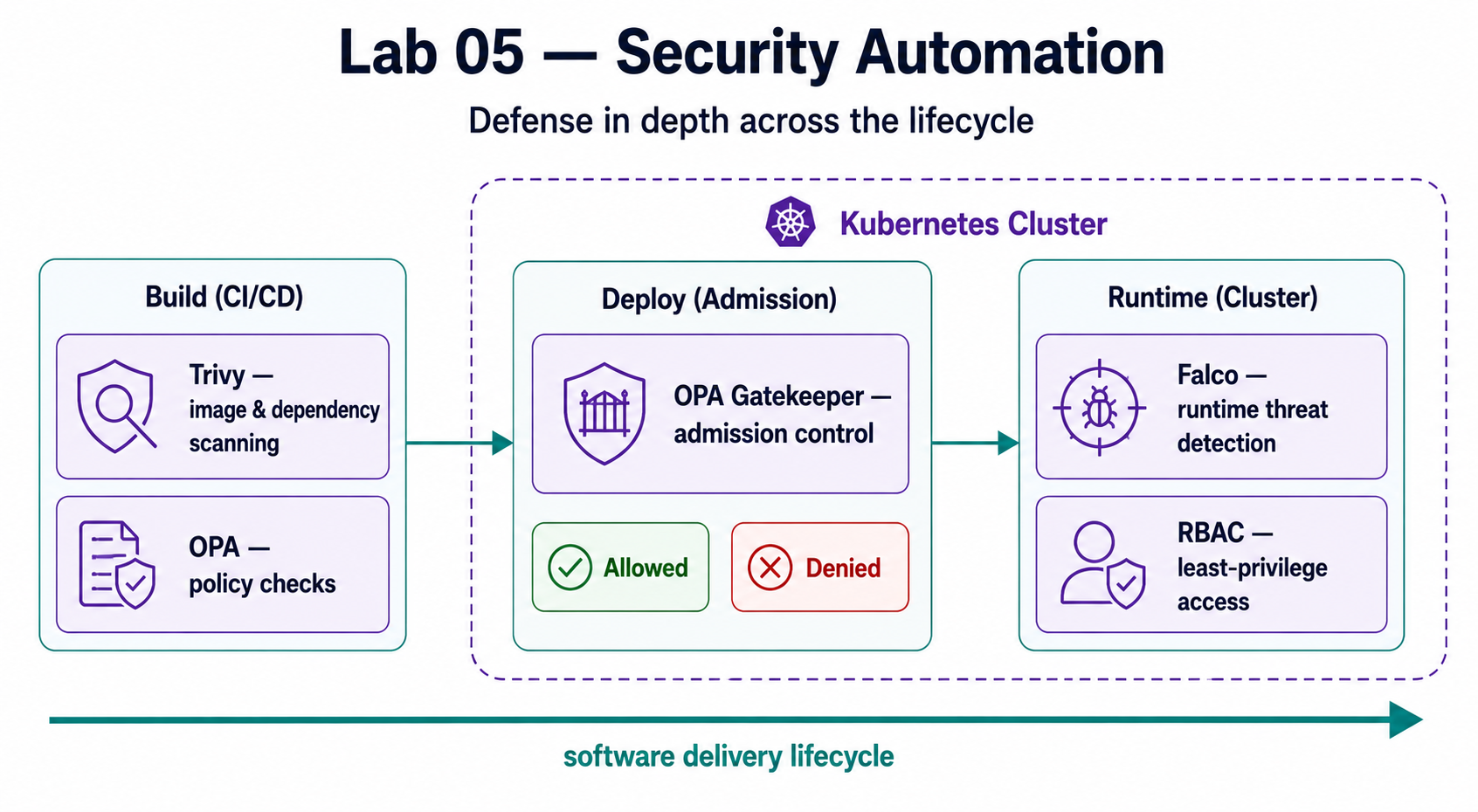
Security Layers
| Layer | Tool | Protection |
|---|---|---|
| Build | Trivy | Vulnerable dependencies, misconfigurations |
| Deploy | OPA | Policy violations, security requirements |
| Runtime | Falco | Suspicious behavior, attacks |
| Access | RBAC | Unauthorized actions, privilege abuse |
Prerequisites
Required Tools
| Tool | Version | Purpose |
|---|---|---|
| kubectl | 1.32+ | Kubernetes cluster management |
| Helm | 3.10+ | Package management |
| Trivy | 0.45+ | Vulnerability scanning |
AWS Requirements
- EKS Cluster from Lab 02 (or existing Kubernetes cluster)
- kubectl configured to access the cluster
Knowledge Prerequisites
- Basic Kubernetes concepts
- Understanding of Lab 02 (Kubernetes Platform)
- Basic security concepts
Lab Dependencies
Required: Complete Lab 02 first to have an EKS cluster.
Quick Start
For experienced users who want to deploy immediately:
# 1. Navigate to lab directory
cd labs/05-security-automation

# 2. Install all security tools
make install-all

# 3. Verify installation
make status

# 4. Test security tools
make test
Setup time: ~15-20 minutes
Estimated cost: $1-3 to complete (vs $30-50/month if kept running)
Detailed Setup
Step 1: Verify Cluster Access
# Check kubectl is configured
kubectl cluster-info
kubectl get nodes
Step 2: Install Security Tools
You can install components individually or all at once:
# Install all at once (recommended)
make install-all

# Or install individually
make install-trivy
make install-opa
make install-falco
make setup-rbac
Step 3: Verify Installation
# Check status
make status

# Run validation
make validate
Project Structure
labs/05-security-automation/
├── README.md                    # This file
├── Makefile                     # Automation commands
├── trivy/                       # Trivy configurations
│   ├── README.md               # Trivy guide
│   ├── config.yaml             # Trivy configuration
│   └── policies/               # Custom policies
├── opa/                         # OPA Gatekeeper
│   ├── README.md               # OPA guide
│   ├── policies/               # Rego policies
│   └── constraints/            # Kubernetes constraints
├── falco/                       # Falco runtime security
│   ├── README.md               # Falco guide
│   ├── rules/                  # Custom Falco rules
│   └── config.yaml             # Falco configuration
├── rbac/                        # RBAC configurations
│   ├── README.md               # RBAC guide
│   ├── roles/                  # Role definitions
│   └── bindings/               # Role bindings
└── scripts/                     # Automation scripts
    ├── validate.sh             # Validation script
    └── test-security.sh        # Security testing
Security Tools
Trivy (Vulnerability Scanning)
What it does: Scans container images, filesystems, and infrastructure for vulnerabilities.
Key Features:
- Container image scanning
- Filesystem scanning
- IaC scanning (Terraform, CloudFormation)
- Kubernetes cluster scanning
- CI/CD integration
See trivy/README.md for detailed usage.
OPA Gatekeeper (Policy Enforcement)
What it does: Enforces security policies on Kubernetes resources before they're created.
Key Features:
- Admission control
- Policy as code (Rego)
- Pre-built policy templates
- Custom policy creation
See opa/README.md for detailed usage.
Falco (Runtime Security)
What it does: Monitors running containers and detects suspicious behavior in real-time.
Key Features:
- System call monitoring
- Threat detection
- Custom rules
- Alerting integration
See falco/README.md for detailed usage.
RBAC (Access Control)
What it does: Controls who can perform what actions in Kubernetes.
Key Features:
- Role-based permissions
- Service account security
- Least privilege access
- Audit logging
See rbac/README.md for detailed usage.
Integration
CI/CD Integration
Integrate security tools into your CI/CD pipeline:
# GitHub Actions example
- name: Run Trivy scan
  uses: aquasecurity/trivy-action@master
  with:
    image-ref: ${{ env.IMAGE }}
    format: 'sarif'
    output: 'trivy-results.sarif'
Complete Security Flow
- Build: Trivy scans images
- Deploy: OPA validates policies
- Runtime: Falco monitors behavior
- Access: RBAC controls permissions
Usage Examples
Scan Container Image
# Scan image
trivy image nginx:latest

# Scan with specific severity
trivy image --severity HIGH,CRITICAL nginx:latest

# Scan Kubernetes cluster
trivy k8s cluster
Enforce Policy
# Apply OPA constraint
kubectl apply -f opa/constraints/require-resource-limits.yaml

# Test policy violation
kubectl apply -f test-pod-without-limits.yaml
# Should be rejected by OPA
Monitor Runtime
# View Falco events
kubectl logs -n falco -l app=falco

# Test Falco detection
# Execute shell in container (should trigger alert)
kubectl exec -it <pod> -- /bin/sh
Troubleshooting
Trivy Not Finding Vulnerabilities
# Update vulnerability database
trivy image --download-db-only

# Check Trivy version
trivy --version
OPA Policies Not Enforcing
# Check Gatekeeper is running
kubectl get pods -n gatekeeper-system

# Check constraint status
kubectl get constrainttemplate
kubectl get constraint
Falco Not Detecting Events
# Check Falco pods
kubectl get pods -n falco

# Check Falco logs
kubectl logs -n falco -l app=falco

# Verify rules are loaded
kubectl exec -n falco <falco-pod> -- falco --list-rules
Cleanup
Remove All Security Tools
# Uninstall everything
make uninstall-all

# Or manually
make uninstall-trivy
make uninstall-opa
make uninstall-falco
Cost Considerations
Estimated Costs
Monthly Cost (if running continuously): ~$30-50
- Falco: $10-15/month
- OPA Gatekeeper: $5-10/month
- Trivy: Minimal (mostly CI/CD usage)
- RBAC: No additional cost
Cost to Complete (run for 1-2 hours): ~$1-3
- Component deployment: Minimal
- Scanning operations: Negligible
- Monitoring overhead: Included in cluster costs
Cost Optimization
- Use Trivy in CI/CD (free tier available)
- Falco and OPA are lightweight
- RBAC has no additional cost
- Destroy test resources immediately
Next Steps
Immediate Next Actions
- Install security tools and verify they're working
- Test policies by trying to violate them
- Monitor Falco for runtime events
- Review RBAC configurations
Continue Your Learning Journey
Next Recommended Lab
- Lab 06 - GitOps Workflows - Secure GitOps deployments
Related Labs
- Lab 02: Kubernetes Platform - Secure this cluster
- Lab 03: CI/CD Pipelines - Integrate security scanning
- Lab 04: Observability Stack - Monitor security events
Additional Resources
Documentation
Learning Resources
Outcome: scanning, policy enforcement, runtime protection, and access control are now running automatically instead of depending on manual review.
Next: Lab 06 · GitOps Workflows — deploy through a declarative, auditable pipeline.
Navigation: ◀ Lab 04 · Observability Stack · All labs · Lab 06 · GitOps Workflows ▶