Lab 02 · Kubernetes Platform
DevOps Studio › Labs › Lab 02 · ⏱ 2–3 hours · Intermediate
Stand up a production Amazon EKS cluster and run an app on it. By the end you'll have a managed Kubernetes control plane, worker node groups across availability zones, and a sample app reachable through an ingress.
On this page: Architecture · Prerequisites · Quick Start · Detailed Setup · Project Structure · Configuration · Troubleshooting · Cleanup
What you build
- EKS cluster — a managed, multi-AZ control plane
- Managed node groups — auto-scaling worker nodes
- Helm-deployed sample app
- Ingress controller — external access to your services
- IRSA & security groups — pod-level AWS permissions
Skills you'll practice: EKS provisioning · node groups · Helm charts · Services and Ingress · kubectl basics · pod networking.
Architecture
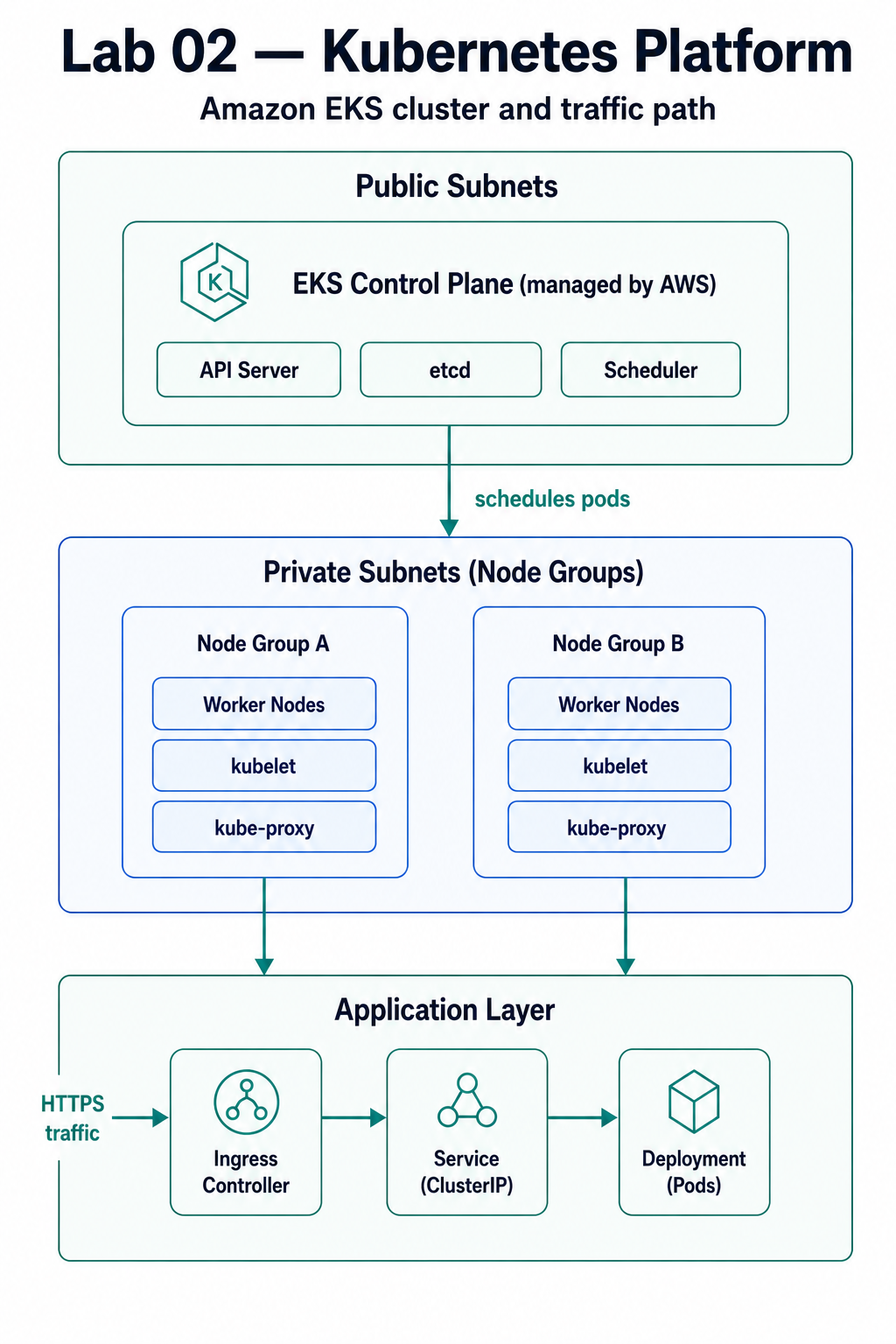
Component Details
| Component | Purpose | High Availability | Security |
|---|---|---|---|
| EKS Cluster | Kubernetes control plane | Multi-AZ (managed) | IAM authentication |
| Node Groups | Worker nodes for pods | Multi-AZ, auto-scaling | Security groups, IRSA |
| VPC CNI | Pod networking | Multi-AZ | Network isolation |
| CoreDNS | Service discovery | Replicated | Namespace isolation |
| Ingress Controller | External access | Replicated | TLS termination |
Prerequisites
Required Tools
| Tool | Version | Purpose |
|---|---|---|
| AWS CLI | 2.0+ | AWS resource management |
| Terraform | 1.9+ | Infrastructure provisioning |
| kubectl | 1.32+ | Kubernetes cluster management |
| Helm | 3.10+ | Kubernetes package management |
| Git | 2.0+ | Version control |
AWS Requirements
- AWS Account with billing enabled
- IAM User with programmatic access
- Required Permissions:
- EKS Full Access
- EC2 Full Access (for node groups)
- VPC Full Access
- IAM permissions for roles and policies
- CloudWatch Full Access
Knowledge Prerequisites
- Basic Kubernetes concepts (pods, services, deployments)
- Understanding of Lab 01 (VPC, networking)
- Command line comfort
- Basic container concepts
Lab 01 Dependency
Important: Lab 02 can work standalone, but for best results, complete Lab 01 first. Lab 02 can optionally use Lab 01's VPC infrastructure.
Quick Start
For experienced users who want to deploy immediately:
# 1. Navigate to lab directory
cd labs/02-kubernetes-platform

# 2. Set up backend (if not already done)
./scripts/setup-backend.sh

# 3. Configure
cp terraform.tfvars.example terraform.tfvars
# Edit terraform.tfvars with your preferences

# 4. Deploy EKS cluster
make apply

# 5. Configure kubectl
make configure-kubectl

# 6. Deploy sample application
make deploy-app

# 7. Test
make test
Deployment time: ~20-25 minutes
Estimated cost: $5-10 to complete (vs $120-180/month if kept running)
Detailed Setup
Step 1: Verify Prerequisites
# Check AWS CLI
aws --version
aws sts get-caller-identity

# Check Terraform
terraform version

# Check kubectl
kubectl version --client

# Check Helm
helm version
Step 2: Repository Setup
# Navigate to lab directory
cd labs/02-kubernetes-platform

# Verify file structure
ls -la
Step 3: Backend Configuration
# Set up Terraform backend (S3 + DynamoDB)
./scripts/setup-backend.sh
Step 4: Configuration Customization
# Copy example configuration
cp terraform.tfvars.example terraform.tfvars

# Edit with your preferences
nano terraform.tfvars
Key Configuration Options
# Basic settings
project_name = "devops-studio"
environment = "dev"
region = "us-west-2"

# EKS Configuration
cluster_version = "1.32"
cluster_name = "devops-studio-eks"

# Node Group Configuration
node_instance_type = "t3.medium"
node_min_size = 1
node_max_size = 3
node_desired_size = 2

# Networking (can use Lab 01 VPC or create new)
# vpc_id = ""  # Leave empty to create new VPC
# Or use existing VPC from Lab 01
Project Structure
labs/02-kubernetes-platform/
├── README.md                    # This file
├── Makefile                     # Automation commands
├── main.tf                      # Main EKS infrastructure
├── variables.tf                 # Input variables
├── outputs.tf                   # Output values
├── backend.tf.example           # Backend configuration template
├── terraform.tfvars.example     # Example configuration
├── modules/
│   └── eks/                     # EKS cluster module
│       ├── main.tf             # EKS resources
│       ├── variables.tf        # Module variables
│       └── outputs.tf          # Module outputs
├── environments/               # Environment-specific configs
│   ├── dev.tfvars             # Development settings
│   ├── staging.tfvars         # Staging settings
│   └── prod.tfvars            # Production settings
├── manifests/                  # Kubernetes manifests
│   ├── namespace.yaml         # Namespace definitions
│   ├── deployment.yaml        # Sample deployments
│   ├── service.yaml           # Service definitions
│   └── ingress.yaml           # Ingress configurations
├── helm-charts/                # Helm charts
│   ├── nginx-ingress/         # NGINX Ingress chart
│   └── sample-app/            # Sample application chart
└── scripts/                   # Automation scripts
    ├── setup-backend.sh       # Backend initialization
    ├── configure-kubectl.sh   # kubectl configuration
    ├── validate.sh            # Cluster validation
    └── cleanup.sh             # Resource cleanup
Configuration
Environment Variables
The lab supports environment-specific configurations:
# Deploy to different environments
make apply ENV=dev        # Uses environments/dev.tfvars
make apply ENV=staging    # Uses environments/staging.tfvars
make apply ENV=prod       # Uses environments/prod.tfvars
Variable Validation
All variables include validation rules:
variable "cluster_version" {
  description = "Kubernetes version for EKS cluster"
  type        = string
  default     = "1.32"

  validation {
    condition     = can(regex("^1\\.(2[0-9]|3[0-9])$", var.cluster_version))
    error_message = "Cluster version must be a valid Kubernetes version (1.20-1.39)."
  }
}
Deployment
Using Make Commands (Recommended)
# Initialize Terraform
make init

# Create execution plan
make plan

# Apply changes (deploys EKS cluster)
make apply

# Configure kubectl to use the cluster
make configure-kubectl

# Verify cluster access
make verify-cluster

# Deploy sample application
make deploy-app

# View cluster information
make cluster-info
Direct Terraform Commands
# Initialize
terraform init

# Plan with specific environment
terraform plan -var-file="environments/dev.tfvars"

# Apply
terraform apply -var-file="environments/dev.tfvars"

# Show outputs
terraform output
Deployment Phases
The deployment creates resources in this order:
Networking (2-3 minutes)
- VPC (if not using existing)
- Subnets for EKS
- Security groups
IAM Roles (1-2 minutes)
- EKS cluster role
- Node group role
- Service account roles
EKS Cluster (10-15 minutes)
- Control plane creation
- Add-ons installation
- Cluster endpoint configuration
Node Groups (5-8 minutes)
- Launch template creation
- Node group provisioning
- Node registration
Helm Charts (2-3 minutes)
- NGINX Ingress installation
- Metrics Server installation
- Chart validation (lint + template rendering)
Total deployment time: 20-25 minutes
Testing & Validation
Automated Validation
# Run all validation tests
make test

# Individual test components:
./scripts/validate.sh
Helm Chart Validation
Before deploying Helm charts, validate them:
# Lint Helm charts (checks for errors and best practices)
make lint-helm

# Validate template rendering (ensures templates are valid)
make validate-helm

# Both validations run automatically before deployment
make deploy-helm-chart
Validation checks:
- Chart structure and metadata
- Template syntax correctness
- Values file validation
- Kubernetes manifest rendering
Test Coverage
| Test | Description | Success Criteria |
|---|---|---|
| Cluster Access | kubectl can connect | kubectl get nodes succeeds |
| Node Health | All nodes are ready | All nodes show Ready status |
| CoreDNS | DNS resolution works | CoreDNS pods running |
| Ingress | Ingress controller ready | Ingress controller pods running |
| Sample App | Application deploys | Deployment shows available replicas |
| Helm Charts | Charts are valid | helm lint passes, templates render |
Manual Testing
# Get cluster endpoint
CLUSTER_NAME=$(terraform output -raw cluster_name)
REGION=$(terraform output -raw region)

# Configure kubectl
aws eks update-kubeconfig --name $CLUSTER_NAME --region $REGION

# Check cluster status
kubectl cluster-info

# List nodes
kubectl get nodes

# List all pods
kubectl get pods --all-namespaces

# Check services
kubectl get services --all-namespaces

# Test sample application
kubectl get ingress -n default
Monitoring
CloudWatch Integration
The EKS cluster includes comprehensive monitoring:
Metrics Collected
- EKS: Cluster health, API server metrics
- Node Groups: CPU, memory, disk usage
- Pods: Resource utilization
- Services: Request rates, latency
Log Groups
/aws/eks/${cluster-name}/cluster: Control plane logs/aws/containerinsights/${cluster-name}/performance: Container insights
Accessing Metrics
# View cluster metrics in CloudWatch
aws cloudwatch list-metrics --namespace "ContainerInsights"

# View node group metrics
aws cloudwatch get-metric-statistics \
  --namespace AWS/EKS \
  --metric-name CPUUtilization \
  --dimensions Name=ClusterName,Value=$(terraform output -raw cluster_name)
Troubleshooting
Common Issues
kubectl Connection Fails
# Error: Unable to connect to the server
# Solution: Update kubeconfig
make configure-kubectl

# Or manually:
aws eks update-kubeconfig --name <cluster-name> --region <region>
Nodes Not Joining Cluster
# Check node group status
aws eks describe-nodegroup \
  --cluster-name <cluster-name> \
  --nodegroup-name <nodegroup-name>

# Check node group IAM role
# Ensure node group role has required policies
Pods Stuck in Pending
# Check pod events
kubectl describe pod <pod-name>

# Check node resources
kubectl top nodes

# Check for taints
kubectl get nodes -o custom-columns=NAME:.metadata.name,TAINTS:.spec.taints
Ingress Not Working
# Check ingress controller
kubectl get pods -n ingress-nginx

# Check ingress status
kubectl describe ingress <ingress-name>

# Check service
kubectl get svc -n ingress-nginx
Cleanup
Quick Cleanup
# Destroy all infrastructure
make destroy

# Confirm destruction
# Type 'y' when prompted
Complete Cleanup
# Destroy infrastructure and backend resources
./scripts/cleanup.sh
Selective Cleanup
# Delete specific resources
kubectl delete namespace <namespace>
terraform destroy -target=module.eks
Cost Considerations
Estimated Costs
Monthly Cost (if running continuously): ~$120-180
- EKS Control Plane: $73/month
- Node Instances: $30-60/month (2x t3.medium)
- Load Balancer: $22/month
- Data Transfer: $5-10/month
Cost to Complete (run for 4 hours then destroy): ~$5-10
- Pro-rated hourly costs
- Most expensive component is control plane ($0.10/hour)
Cost Optimization
# Scale down node groups when not in use
terraform apply -var="node_desired_size=0" -var="node_min_size=0"

# Use smaller instance types for dev
node_instance_type = "t3.small"  # Instead of t3.medium

# Destroy immediately after completion
make destroy
Next Steps
Immediate Next Actions
- Deploy the cluster and verify all components work
- Experiment with deployments by scaling applications
- Review CloudWatch metrics and understand the data
- Test Ingress by accessing applications externally
- Explore Helm charts and customize values
Continue Your Learning Journey
Next Recommended Lab
- Lab 03 - CI/CD Pipelines - Automate deployments to this EKS cluster
Related Labs
- Lab 04: Observability Stack - Add Prometheus/Grafana monitoring
- Lab 06: GitOps Workflows - Deploy with ArgoCD
- Lab 05: Security Automation - Implement security scanning
Additional Resources
Documentation
Learning Resources
Outcome: a production-ready EKS cluster with worker nodes, IRSA, and a sample app reachable through an ingress.
Next: Lab 03 · CI/CD Pipelines — automate deployments to this cluster.
Navigation: ◀ Lab 01 · Terraform Foundations · All labs · Lab 03 · CI/CD Pipelines ▶