DevOps Studio


Great Solution Architects don't stop at diagrams.
They understand what happens after the customer signs: every architecture eventually becomes infrastructure, and every decision eventually becomes code.
This is not a DevOps course. It's a collection of implementation patterns I've used to bridge customer architecture into production-ready systems.
These labs document the implementation patterns, deployment strategies, operational tradeoffs, and production considerations that separate a successful design from a failed deployment. They come directly from enterprise customer work spanning cloud migrations, hybrid environments, regulated industries, and production platform deployments.
Scope: DevOps Studio covers the core delivery competencies that apply across any engagement — infrastructure as code, container platforms, CI/CD, observability, security automation, GitOps, and platform engineering. For what changes when the customer's environment is constrained (air-gapped, firewall-restricted, multi-tenant), see Implementation Studio.
What This Demonstrates
- Translating customer requirements into infrastructure
- Designing production-ready deployment strategies
- Evaluating architectural tradeoffs
- Implementation planning
- Platform modernization
- Operational readiness
- Reliability engineering
- Customer enablement
New here? Read the Prerequisites, then pick a Learning Path and start with Lab 01.
You'll need an AWS account. Most labs deploy real AWS resources, so they cost money while running. Use a sandbox account, set a budget alert, and run
make destroywhen you're done — completing a lab and tearing it down is typically a few dollars. You can read the code and runterraform validatewithout an account, but deploying requires one.
Full docs are also published as a browsable site (VitePress). See Documentation site to run it locally.
On this page: Labs · How each lab is framed · Quick start · Documentation · Repository structure · Docs site · Contributing
Labs
| Lab | Customer problem | Implementation details | Time | Difficulty |
|---|---|---|---|---|
| 01 · Terraform Foundations | Establish a secure, repeatable AWS foundation for application workloads | Terraform, AWS VPC, ASG, RDS | 1-2 h | Beginner |
| 02 · Kubernetes Platform | Provide a managed container platform while balancing cost, control, and operational burden | EKS, Helm, kubectl, Ingress | 2-3 h | Intermediate |
| 03 · CI/CD Pipelines | Standardize software delivery from commit to deployment with auditable automation | GitHub Actions, GitLab CI, Jenkins | 1-2 h | Beginner |
| 04 · Observability Stack | Give operators enough telemetry to detect, investigate, and respond to production issues | Prometheus, Grafana, Jaeger, OpenSearch | 2-3 h | Advanced |
| 05 · Security Automation | Enforce guardrails without slowing delivery teams or relying on manual review alone | Trivy, OPA, Falco, RBAC | 1-2 h | Advanced |
| 06 · GitOps Workflows | Make environment changes reviewable, repeatable, and recoverable through declarative delivery | Kustomize, Argo CD, Flux | 1-2 h | Intermediate |
| 07 · Serverless Operations | Run event-driven workloads with clear ownership, monitoring, and failure handling | Lambda, API Gateway, Step Functions, DynamoDB | 1-2 h | Intermediate |
| 08 · Platform Engineering | Turn repeatable infrastructure patterns into self-service capabilities for delivery teams | Service catalog, platform APIs, automation | 3-4 h | Expert |
See labs/ for the suggested order, or follow a role-based Learning Path.
How Each Lab Is Framed
Each lab starts from a customer scenario, then moves through:
- Customer requirement
- Architecture decision
- Tradeoffs
- Implementation
- Validation
- Operations
Every lab should answer four questions:
- Why would a customer need this?
- When should this be recommended?
- What tradeoffs exist?
- What happens in production?
Quick start
git clone https://github.com/WBHankins93/devops-studio.git
cd devops-studio

# Check tools and AWS access (see Prerequisites guide for the full list)
./tools/validate.sh

# Start a lab — each one is driven by its Makefile
cd labs/01-terraform-foundations
make init && make plan && make apply

# Always tear down when finished
make destroy
The Getting Started guide walks through tool installation, AWS configuration, and an interactive setup (./tools/setup.sh). Costs are per-lab and small when you destroy promptly — see Cost Management.
Documentation
| Guide | What it covers |
|---|---|
| Prerequisites | Required tools, AWS account setup, IAM permissions, system requirements |
| Getting Started | Step-by-step setup and your first lab |
| Learning Paths | Lab sequences for different platform-building scenarios (cloud-native delivery, DevSecOps, platform engineering, cloud architecture) |
| Cost Management | Per-lab estimates, optimization, budget alerts |
| Makefile Guide | The common make targets used across labs |
| Observability Tools | Prometheus, Grafana, Jaeger, and OpenSearch explained |
| Troubleshooting | Common setup and lab-specific issues |
| Architecture Decisions | ADRs recording why key choices were made |
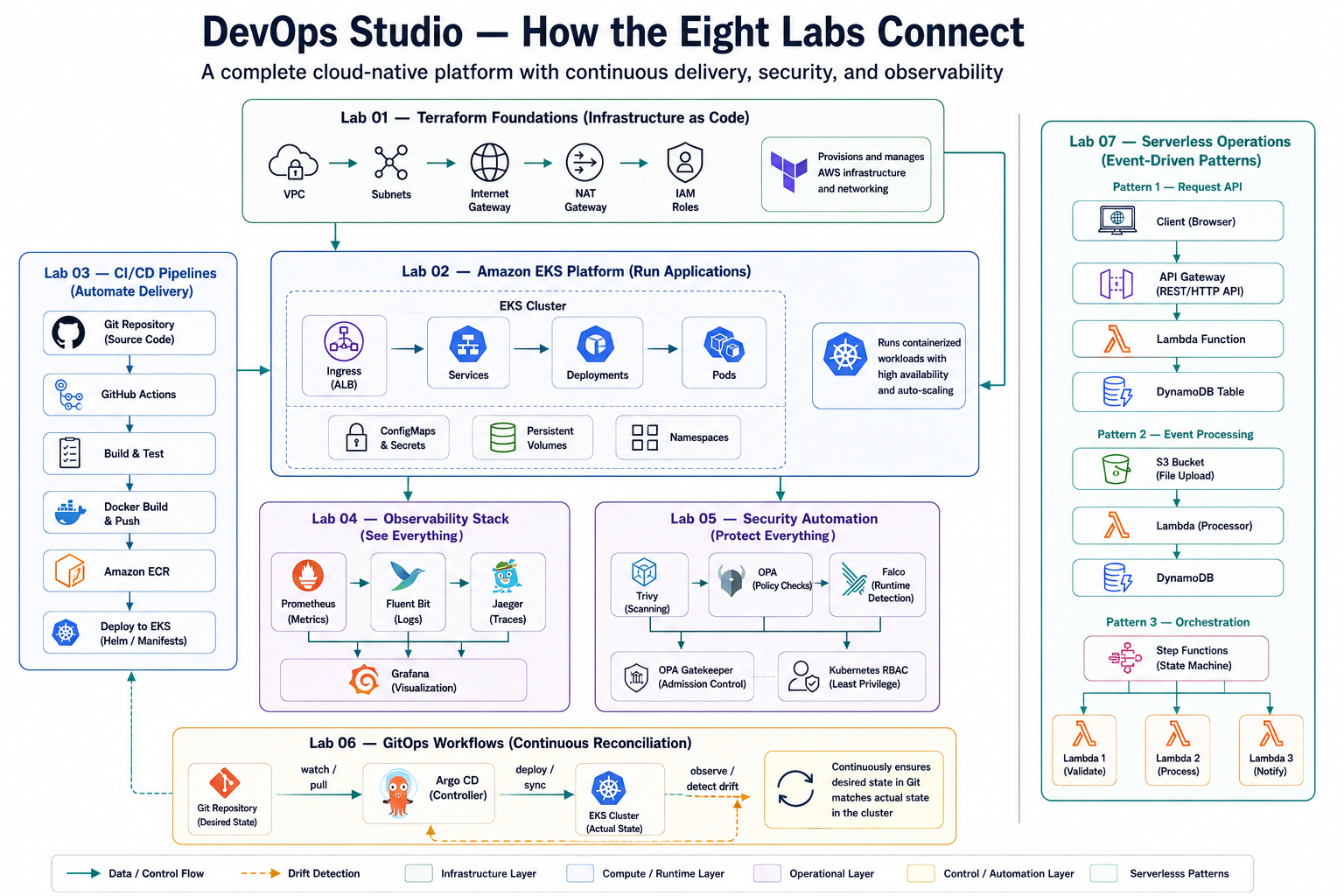
How it all connects
The labs compose into one implementation path: infrastructure foundation, workload platform, delivery pipeline, observability, security automation, GitOps, serverless operations, and internal platform enablement.
Repository structure
devops-studio/
├── index.md             # Docs-site home (VitePress)
├── .vitepress/          # Docs-site config
├── labs/                # Eight customer-scenario labs (each: code, README, Makefile, scripts)
├── docs/                # Guides + architecture-decisions/ (ADRs)
├── tools/               # bootstrap / setup / validate / cleanup / cost-estimate scripts
└── .github/workflows/   # CI: terraform validation, lab tests, security scan, docs build
Documentation site
The guides and lab READMEs are published as a searchable site built with VitePress. The build fails on any broken internal link, so it doubles as link-check CI.
npm install
npm run docs:dev      # local preview at /devops-studio/
npm run docs:build    # production build (also the link check)
Contributing
Contributions are welcome — new labs, fixes, and documentation improvements. See CONTRIBUTING.md for the process and lab guidelines. Report bugs or ask questions via GitHub Issues and Discussions.
License
MIT — see LICENSE.