Lab 03 · CI/CD Pipelines
DevOps Studio › Labs › Lab 03 · ⏱ 1–2 hours · Beginner
Automate the path from a git commit to a deployed app — three different ways. By the end you'll have working build → test → scan → deploy pipelines in GitHub Actions, GitLab CI, and Jenkins.
On this page: Architecture · Prerequisites · Quick Start · Detailed Setup · Project Structure · GitHub Actions · Troubleshooting · Cleanup
What you build
- A sample app with unit and integration tests
- A GitHub Actions pipeline
- A GitLab CI pipeline
- A Jenkins pipeline
- Image build + push to ECR, then deploy to Kubernetes
Skills you'll practice: Pipeline design · automated testing · container builds · image registries · deploying to Kubernetes · comparing CI tools.
Architecture
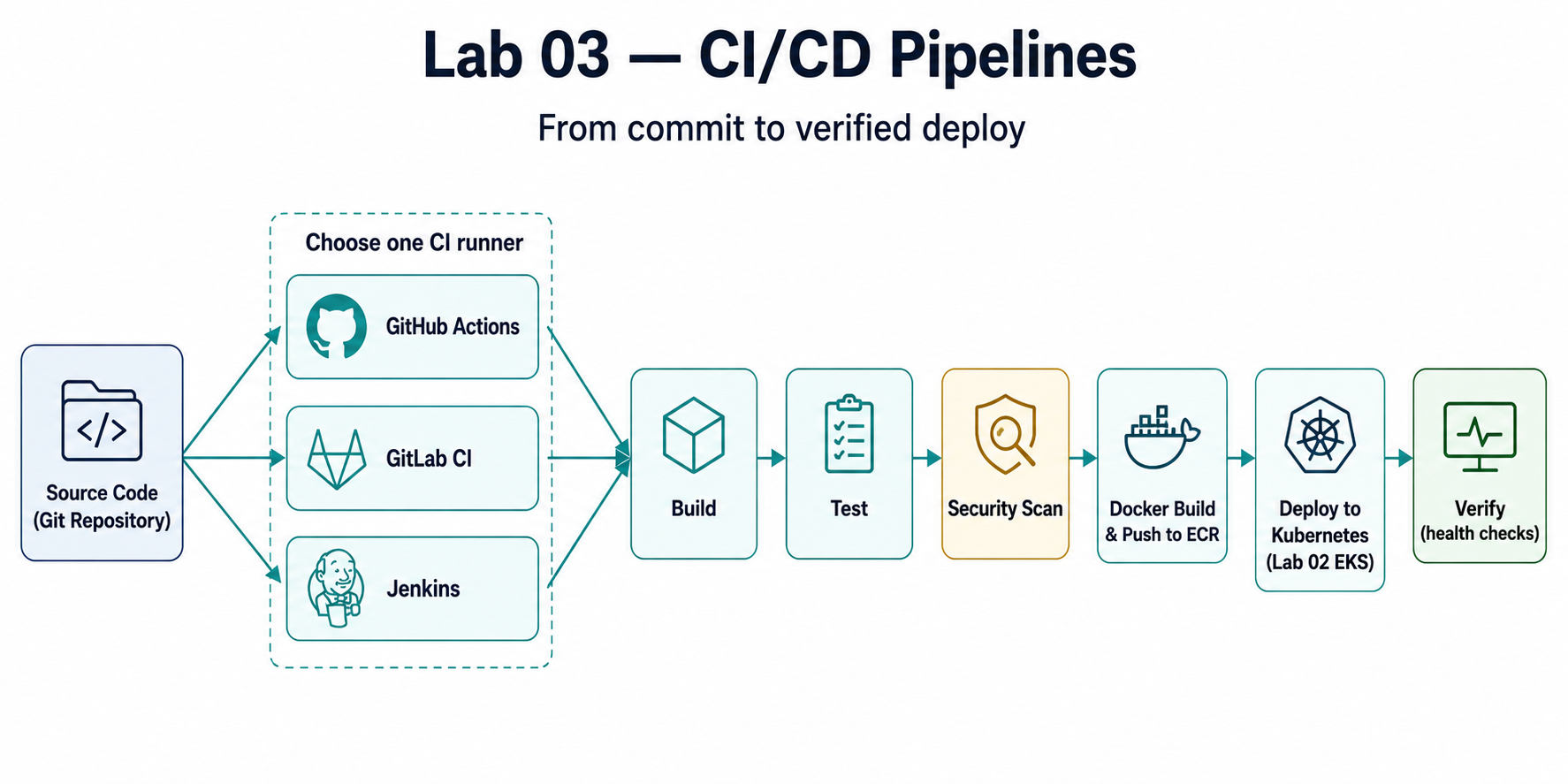
Pipeline Stages
- Source: Code in Git repository
- Build: Compile, build Docker images
- Test: Unit tests, integration tests
- Scan: Security and vulnerability scanning
- Deploy: Deploy to Kubernetes cluster
- Verify: Health checks and smoke tests
Prerequisites
Required Tools
| Tool | Version | Purpose |
|---|---|---|
| Docker | 20.0+ | Container image building |
| Git | 2.0+ | Version control |
| kubectl | 1.32+ | Kubernetes deployment |
| Helm | 3.10+ | Kubernetes package management |
AWS Requirements
- AWS Account with billing enabled
- ECR (Elastic Container Registry) access
- EKS Cluster from Lab 02 (optional but recommended)
Knowledge Prerequisites
- Basic Git workflow
- Docker fundamentals
- Kubernetes basics (from Lab 02)
- Understanding of CI/CD concepts
Lab Dependencies
Recommended: Complete Lab 02 first to have an EKS cluster for deployments.
Quick Start
For experienced users who want to set up CI/CD immediately:
# 1. Navigate to lab directory
cd labs/03-cicd-pipelines

# 2. Choose your CI/CD tool
# Option A: GitHub Actions (recommended for GitHub repos)
cp github-actions/.github/workflows/ci-cd.yml ../../.github/workflows/

# Option B: GitLab CI
# Copy .gitlab-ci.yml to your GitLab repository root

# Option C: Jenkins
# Set up Jenkins and use the Jenkinsfile

# 3. Configure secrets/variables
# GitHub: Repository Settings > Secrets
# GitLab: CI/CD > Variables
# Jenkins: Credentials

# 4. Push code to trigger pipeline
git add .
git commit -m "Add CI/CD pipeline"
git push
Setup time: ~10-15 minutes
Estimated cost: $1-2 to complete (vs $20-40/month if kept running)
Detailed Setup
Step 1: Choose Your CI/CD Tool
This lab supports three CI/CD platforms:
- GitHub Actions - Best for GitHub repositories
- GitLab CI - Best for GitLab repositories
- Jenkins - Best for self-hosted or on-premises
You can use one or all of them. Each has complete examples.
Step 2: Sample Application Setup
The lab includes a sample application:
cd labs/03-cicd-pipelines
ls -la app/
Step 3: Configure CI/CD Platform
Follow the specific setup instructions for your chosen platform in the sections below.
Project Structure
labs/03-cicd-pipelines/
├── README.md                    # This file
├── Makefile                     # Automation commands
├── app/                         # Sample application
│   ├── Dockerfile              # Container image definition
│   ├── src/                    # Application source code
│   ├── tests/                  # Test files
│   └── package.json            # Dependencies
├── github-actions/             # GitHub Actions workflows
│   └── .github/
│       └── workflows/
│           ├── ci.yml         # Continuous Integration
│           ├── cd.yml         # Continuous Deployment
│           └── security.yml   # Security scanning
├── gitlab-ci/                  # GitLab CI configuration
│   └── .gitlab-ci.yml         # GitLab CI pipeline
├── jenkins/                    # Jenkins pipelines
│   └── Jenkinsfile            # Jenkins pipeline definition
├── k8s/                        # Kubernetes manifests
│   ├── deployment.yaml        # Application deployment
│   ├── service.yaml           # Service definition
│   └── ingress.yaml           # Ingress configuration
└── scripts/                    # Automation scripts
    ├── build.sh               # Build script
    ├── test.sh                # Test script
    └── deploy.sh              # Deployment script
GitHub Actions
Workflow Overview
GitHub Actions workflows are defined in .github/workflows/ directory.
CI Workflow
The CI workflow runs on every push and pull request:
name: CI Pipeline

on:
  push:
    branches: [ main, develop ]
  pull_request:
    branches: [ main ]

jobs:
  test:
    runs-on: ubuntu-latest
    steps:
      - uses: actions/checkout@v4
      - name: Run tests
        run: ./scripts/test.sh
CD Workflow
The CD workflow deploys to Kubernetes:
name: CD Pipeline

on:
  push:
    branches: [ main ]

jobs:
  deploy:
    runs-on: ubuntu-latest
    steps:
      - uses: actions/checkout@v4
      - name: Deploy to Kubernetes
        run: ./scripts/deploy.sh
Setup Instructions
Copy workflows to repository:
bashcp -r github-actions/.github ../../.github/Configure secrets (Repository Settings > Secrets):
AWS_ACCESS_KEY_IDAWS_SECRET_ACCESS_KEYKUBECONFIG(base64 encoded)
Push code to trigger workflows
GitLab CI
Pipeline Overview
GitLab CI uses .gitlab-ci.yml in the repository root.
Configuration
stages:
  - build
  - test
  - security
  - deploy

build:
  stage: build
  script:
    - docker build -t app:latest .
    - docker push $CI_REGISTRY_IMAGE:$CI_COMMIT_SHA
Setup Instructions
- Copy
.gitlab-ci.ymlto your GitLab repository root - Configure CI/CD variables (Settings > CI/CD > Variables):
AWS_ACCESS_KEY_IDAWS_SECRET_ACCESS_KEYKUBECONFIG
- Enable GitLab Runners or use shared runners
- Push code to trigger pipeline
Jenkins
Pipeline Overview
Jenkins uses a Jenkinsfile for pipeline as code.
Setup Instructions
- Install Jenkins (local or server)
- Install required plugins:
- Pipeline
- Docker Pipeline
- Kubernetes
- Git
- Configure credentials:
- AWS credentials
- Docker registry credentials
- Kubernetes kubeconfig
- Create pipeline from Jenkinsfile
- Trigger builds manually or via webhooks
Testing & Validation
Automated Tests
The lab includes automated testing:
# Run tests locally
./scripts/test.sh

# Run in CI/CD
# Tests run automatically in pipelines
Test Types
- Unit Tests: Application logic
- Integration Tests: Component integration
- Security Tests: Vulnerability scanning
- Smoke Tests: Post-deployment validation
Deployment
Kubernetes Deployment
Deploy to the EKS cluster from Lab 02:
# Configure kubectl (if not already done)
cd ../02-kubernetes-platform
make configure-kubectl

# Deploy application
cd ../03-cicd-pipelines
kubectl apply -f k8s/
Deployment Strategies
- Rolling Update: Default Kubernetes strategy
- Blue-Green: Using multiple deployments
- Canary: Gradual rollout
Troubleshooting
Common Issues
Pipeline Fails on Build
# Check Docker build locally
docker build -t test-app .

# Check Dockerfile syntax
docker build --no-cache -t test-app .
Deployment Fails
# Check cluster access
kubectl cluster-info

# Check deployment status
kubectl get deployments
kubectl describe deployment <deployment-name>
Secrets Not Found
- Verify secrets are configured in CI/CD platform
- Check secret names match workflow references
- Ensure secrets have correct permissions
Cleanup
Remove Deployed Resources
# Delete Kubernetes resources
kubectl delete -f k8s/

# Delete Docker images from ECR
aws ecr list-images --repository-name <repo-name>
aws ecr batch-delete-image --repository-name <repo-name> --image-ids ...
Cost Considerations
Estimated Costs
Monthly Cost (if running continuously): ~$20-40
- CI/CD Runner costs: $10-20/month
- ECR storage: $5-10/month
- Kubernetes resources: $5-10/month
Cost to Complete (run pipelines for 1-2 hours): ~$1-2
- Pipeline execution: Minimal (mostly compute time)
- ECR storage: Negligible for small images
- Kubernetes deployment: Included in Lab 02 costs
Cost Optimization
- Use GitHub Actions free tier (2000 minutes/month for private repos)
- Use GitLab shared runners (free tier available)
- Clean up old Docker images regularly
- Destroy test deployments immediately
Next Steps
Immediate Next Actions
- Set up a CI/CD tool and configure workflows
- Test the pipeline with sample commits
- Deploy to Kubernetes and verify
- Experiment with different deployment strategies
Continue Your Learning Journey
Next Recommended Lab
- Lab 04 - Observability Stack - Monitor your CI/CD deployments
Related Labs
- Lab 02: Kubernetes Platform - Deploy to this cluster
- Lab 06: GitOps Workflows - Advanced GitOps patterns
Additional Resources
Documentation
Learning Resources
Understanding the Tools
- CI/CD Tools Comparison - Detailed comparison of GitHub Actions, GitLab CI, and Jenkins
Outcome: code changes now build, test, and deploy automatically through the pipeline you configured.
Next: Lab 04 · Observability Stack — monitor what this pipeline deploys.
Navigation: ◀ Lab 02 · Kubernetes Platform · All labs · Lab 04 · Observability Stack ▶