Lab 06 · GitOps Workflows
DevOps Studio › Labs › Lab 06 · ⏱ 1–2 hours · Intermediate
Let Git drive your deployments. By the end you'll manage environments with Kustomize and have Argo CD (or Flux) continuously reconcile the cluster to match what's committed in Git.
On this page: Architecture · Prerequisites · Quick Start · Detailed Setup · Project Structure · Kustomize · Troubleshooting · Cleanup
What you build
- Kustomize — a base plus staging and production overlays
- Argo CD — Git-driven deployments with a UI
- Flux — a CLI-based alternative
- Automatic sync & drift detection
Skills you'll practice: GitOps principles · Kustomize overlays · Argo CD · Flux · reconciliation and drift detection · environment promotion.
Architecture
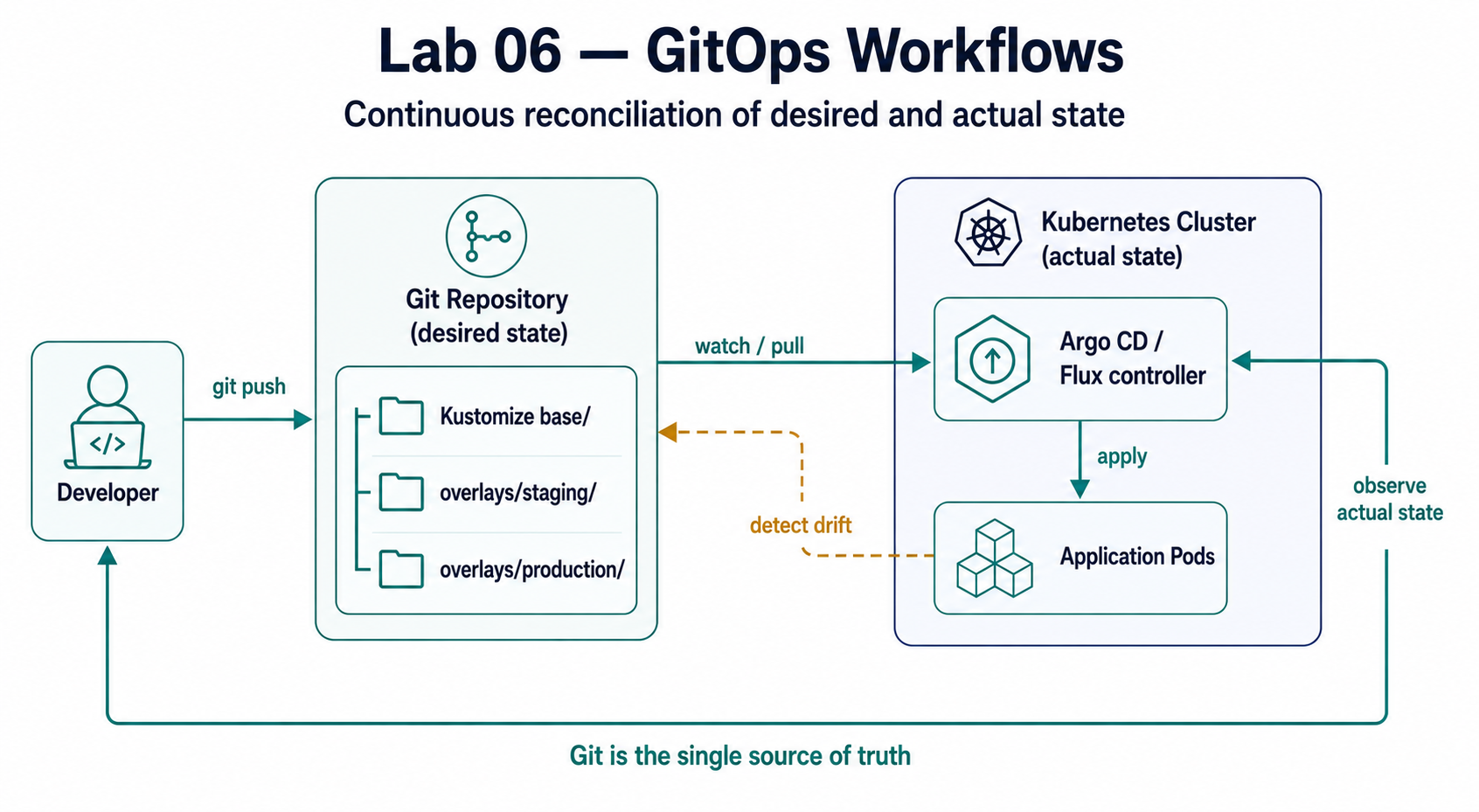
GitOps Workflow
- Developer commits changes to Git
- Kustomize generates environment-specific YAML
- Argo CD/Flux detects Git changes
- Argo CD/Flux applies changes to cluster
- Application is automatically updated
Prerequisites
Required Tools
| Tool | Version | Purpose |
|---|---|---|
| kubectl | 1.32+ | Kubernetes cluster management |
| kustomize | 4.5+ | Configuration management |
| Helm | 3.10+ | Package management |
| Git | 2.30+ | Version control |
AWS Requirements
- EKS Cluster from Lab 02 (or existing Kubernetes cluster)
- kubectl configured to access the cluster
- Git repository (GitHub, GitLab, etc.)
Knowledge Prerequisites
- Basic Kubernetes concepts
- Understanding of Lab 02 (Kubernetes Platform)
- Basic Git knowledge
Lab Dependencies
Required: Complete Lab 02 first to have an EKS cluster.
Quick Start
For experienced users who want to deploy immediately:
# 1. Navigate to lab directory
cd labs/06-gitops-workflows

# 2. Choose your GitOps tool (Argo CD or Flux)
# For Argo CD (visual):
make install-argocd

# For Flux (CLI):
make install-flux

# 3. Set up Kustomize base and overlays
make setup-kustomize

# 4. Verify installation
make status
Setup time: ~20-30 minutes
Estimated cost: $1-3 to complete (vs $20-30/month if kept running)
Detailed Setup
Step 1: Verify Cluster Access
# Check kubectl is configured
kubectl cluster-info
kubectl get nodes
Step 2: Set Up Kustomize
# Create base and overlay structure
make setup-kustomize

# Build staging configuration
kubectl kustomize kustomize/overlays/staging

# Build production configuration
kubectl kustomize kustomize/overlays/production
Step 3: Choose Your GitOps Tool
Option A: Argo CD (Visual Dashboard)
make install-argocd
# Access UI at: https://localhost:8080 (port-forward)
Option B: Flux (CLI-Focused)
make install-flux
# Manage via flux CLI
Step 4: Configure GitOps
# For Argo CD
make configure-argocd

# For Flux
make configure-flux
Project Structure
labs/06-gitops-workflows/
├── README.md                    # This file
├── Makefile                     # Automation commands
├── kustomize/                   # Kustomize configurations
│   ├── base/                    # Base manifests
│   │   ├── kustomization.yaml
│   │   ├── deployment.yaml
│   │   ├── service.yaml
│   │   └── configmap.yaml
│   └── overlays/                # Environment overlays
│       ├── staging/
│       │   ├── kustomization.yaml
│       │   └── patches/
│       └── production/
│           ├── kustomization.yaml
│           └── patches/
├── argocd/                      # Argo CD configuration
│   ├── README.md
│   ├── application.yaml        # App definition
│   └── values.yaml             # Helm values
├── flux/                        # Flux configuration
│   ├── README.md
│   ├── gitrepository.yaml      # Git source
│   └── kustomization.yaml      # Kustomize deployment
├── TOOL-COMPARISON.md          # Detailed comparison
└── scripts/                     # Automation scripts
    ├── validate.sh
    └── test-gitops.sh
Kustomize
Kustomize helps you manage Kubernetes YAML files across multiple environments.
Base Configuration
The base/ directory contains common configurations:
# kustomize/base/kustomization.yaml
apiVersion: kustomize.config.k8s.io/v1beta1
kind: Kustomization

resources:
  - deployment.yaml
  - service.yaml
  - configmap.yaml

commonLabels:
  app: sample-app
  managed-by: kustomize
Environment Overlays
The overlays/ directory contains environment-specific patches:
# kustomize/overlays/staging/kustomization.yaml
apiVersion: kustomize.config.k8s.io/v1beta1
kind: Kustomization

bases:
  - ../../base

replicas:
  - name: sample-app
    count: 2

patches:
  - path: patches/resource-limits.yaml

namespace: staging
See kustomize/README.md for detailed usage.
Argo CD
Argo CD provides a visual GitOps platform with a web dashboard.
Installation
make install-argocdApplication Definition
apiVersion: argoproj.io/v1alpha1
kind: Application
metadata:
  name: sample-app
spec:
  project: default
  source:
    repoURL: https://github.com/your-org/your-repo
    targetRevision: main
    path: kustomize/overlays/staging
    kustomize: {}
  destination:
    server: https://kubernetes.default.svc
    namespace: staging
  syncPolicy:
    automated:
      prune: true
      selfHeal: true
Accessing the UI
# Port-forward to access UI
kubectl port-forward svc/argocd-server -n argocd 8080:443

# Get admin password
kubectl -n argocd get secret argocd-initial-admin-secret -o jsonpath="{.data.password}" | base64 -d
See argocd/README.md for detailed usage.
Flux
Flux provides a lightweight, CLI-focused GitOps solution.
Installation
make install-fluxGitRepository Resource
apiVersion: source.toolkit.fluxcd.io/v1beta2
kind: GitRepository
metadata:
  name: sample-app
  namespace: flux-system
spec:
  interval: 1m
  url: https://github.com/your-org/your-repo
  ref:
    branch: main
Kustomization Resource
apiVersion: kustomize.toolkit.fluxcd.io/v1beta2
kind: Kustomization
metadata:
  name: sample-app
  namespace: flux-system
spec:
  interval: 5m
  path: ./kustomize/overlays/staging
  prune: true
  sourceRef:
    kind: GitRepository
    name: sample-app
  targetNamespace: staging
See flux/README.md for detailed usage.
Tool Comparison
| Feature | Kustomize | Argo CD | Flux |
|---|---|---|---|
| Role | Configuration | Deployment | Deployment |
| Interface | CLI | Visual UI | CLI |
| Architecture | Tool | Centralized | Modular |
| Best For | Organizing YAML | Visual teams | Platform engineers |
| Multi-Tenancy | N/A | Built-in SSO | Kubernetes RBAC |
| Use Case | Write manifests | Deploy with UI | Deploy headless |
Remember: Use Kustomize WITH Argo CD or Flux, not instead of them!
See TOOL-COMPARISON.md for detailed comparison.
Integration Examples
Complete GitOps Workflow
- Write manifests with Kustomize
- Commit to Git repository
- Argo CD/Flux detects changes
- Automatic deployment to cluster
Multi-Environment Deployment
# Staging deployment
kubectl kustomize kustomize/overlays/staging | kubectl apply -f -

# Production deployment
kubectl kustomize kustomize/overlays/production | kubectl apply -f -
Troubleshooting
Kustomize Build Fails
# Validate kustomization.yaml
kubectl kustomize kustomize/base --dry-run=client

# Check for syntax errors
kubectl kustomize kustomize/overlays/staging
Argo CD Not Syncing
# Check Argo CD pods
kubectl get pods -n argocd

# Check application status
kubectl get application -n argocd

# View Argo CD logs
kubectl logs -n argocd -l app.kubernetes.io/name=argocd-application-controller
Flux Not Deploying
# Check Flux controllers
kubectl get pods -n flux-system

# Check GitRepository status
flux get sources git

# Check Kustomization status
flux get kustomizations

# View Flux logs
kubectl logs -n flux-system -l app=source-controller
Cleanup
Remove All GitOps Tools
# Uninstall everything
make uninstall-all

# Or manually
make uninstall-argocd
make uninstall-flux
Cost Considerations
Estimated Costs
Monthly Cost (if running continuously): ~$20-30
- Argo CD: $10-15/month
- Flux: $5-10/month
- Kustomize: No additional cost (CLI tool)
Cost to Complete (run for 1-2 hours): ~$1-3
- Component deployment: Minimal
- GitOps operations: Negligible
- Monitoring overhead: Included in cluster costs
Cost Optimization
- Use Flux for lower overhead (if UI not needed)
- Argo CD and Flux are lightweight
- Kustomize has no additional cost
- Destroy test resources immediately
Next Steps
Immediate Next Actions
- Set up Kustomize base and overlays
- Choose GitOps tool (Argo CD or Flux)
- Configure Git repository connection
- Test automated deployment
Continue Your Learning Journey
Next Recommended Lab
- Lab 07 - Serverless Operations - Serverless applications
Related Labs
- Lab 02: Kubernetes Platform - Deploy to this cluster
- Lab 03: CI/CD Pipelines - Integrate with GitOps
- Lab 05: Security Automation - Secure GitOps deployments
Additional Resources
Documentation
Learning Resources
Outcome: deployments are now driven by Kustomize and Argo CD/Flux — changes to the cluster go through Git, not kubectl apply.
Next: Lab 07 · Serverless Operations — an event-driven workload outside the cluster.
Navigation: ◀ Lab 05 · Security Automation · All labs · Lab 07 · Serverless Operations ▶